


BUILT FOR PUBLIC TRANSIT
Better Transit Decisions Start With Trusted Data
Bring ridership, reliability, route performance, safety, and NTD data into one workspace. Give your teams a consistent way to configure sources, correct records, and prepare data for analysis and reporting.
Start with the suite you need. Expand as your agency’s priorities evolve.
Predictable Costs
Usage-based pricing with no upfront commitmentStart With What You Need
Choose the suite that addresses your most pressing data and reporting priorities.Scale as Needed
Add data sources, capabilities and reporting areas as your needs evolve.BUILT AROUND AGENCY PRIORITIES
Start With Your Top Priority and Expand at Your Pace
Focus on the questions your teams need to answer. Shape the data workflows and configured reports around your agency’s operational, financial, and public reporting priorities.
01 / RIDERSHIP & DEMAND
Understand Where and When People Ride
Explore route, stop, and time-of-day trends, boardings, utilization, and demand patterns through configured ridership reporting.
02 / SERVICE PERFORMANCE
See Where Service Needs Attention
Build a view of on-time performance, early and late service, headway adherence, missed service, and route performance using available agency data.
03 / NTD REPORTING
Simplify NTD Preparation
Bring data collection, validation, exception handling, and reconciliation into a controlled process for selected monthly or annual reporting packages.
04 / EXECUTIVE & PUBLIC ANALYTICS
Communicate Performance With Confidence
Support leadership dashboards and accessible public reporting with governed, repeatable data and reports configured for your audiences.
EXPLORE THE CAPABILITIES
One Workspace,
Across Your Agency’s Priorities
Bring ridership, reliability, route performance, safety, and NTD data together, supported by an Admin Console for access and data mapping.
INSIDE THIS MODULE
Ridership Data Review
Route & Vehicle Odometer Adjustments
Special-Event Context
Available capabilities follow your agency’s configuration and user permissions.
RIDERSHIP
Understand Ridership Across Your Service
Review ridership records and maintain the adjustments and special-event context that help teams interpret passenger activity.
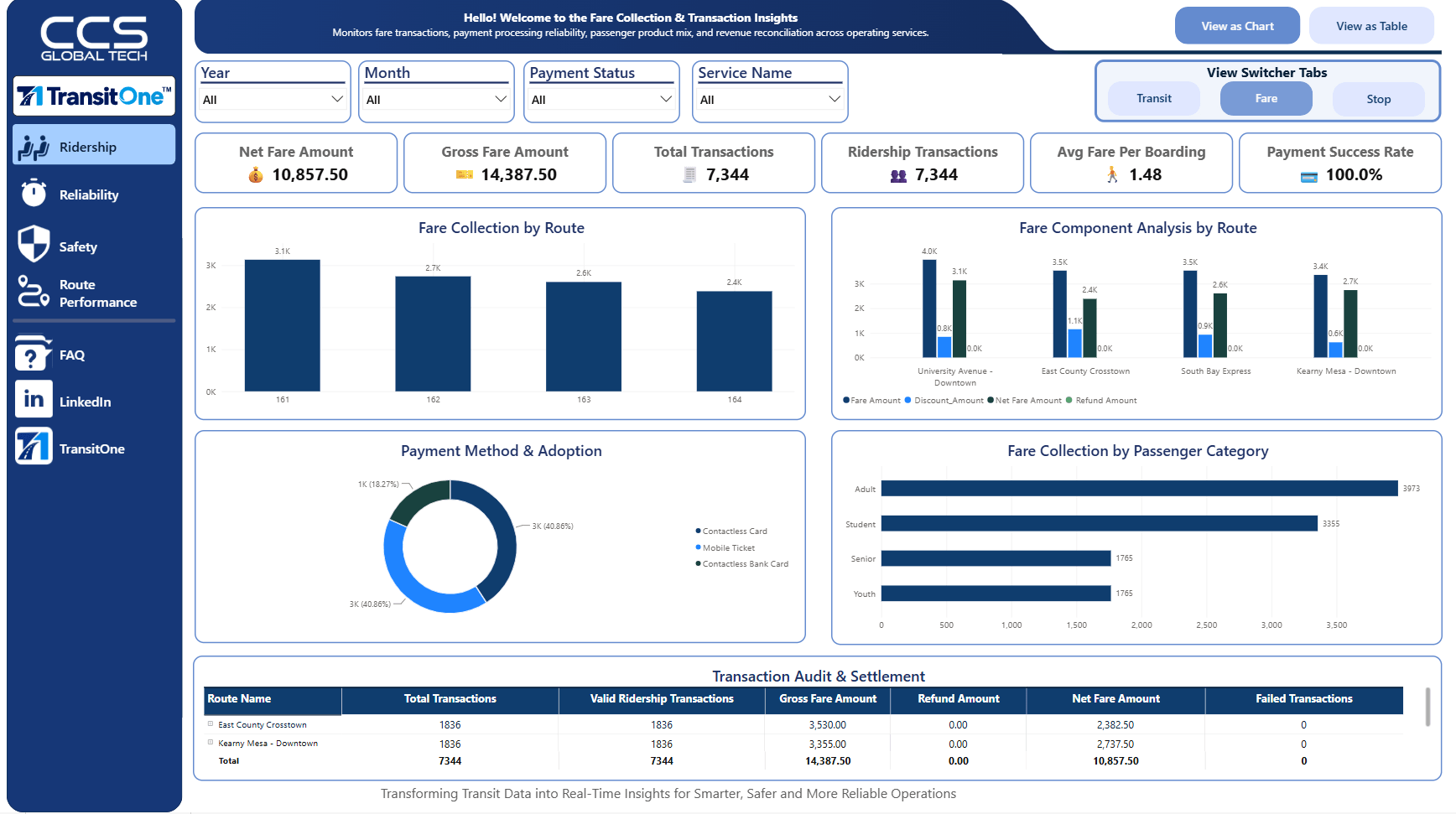
✓ Investigate ridership exceptions in configured source data
✓ Maintain odometer corrections by route, vehicle, and service period
✓ Add special-event context for ridership analysis
✓ Explore ridership through your configured performance dashboard
INSIDE THIS MODULE
Trip & Stop Performance Review
On-Time Performance Adjustments
Reliability Dashboard
Available capabilities follow your agency’s configuration and user permissions.
RELIABILITY
Understand Ridership Across Your Service
Help operations teams review trip and stop performance data and maintain on-time performance corrections with clear service context.
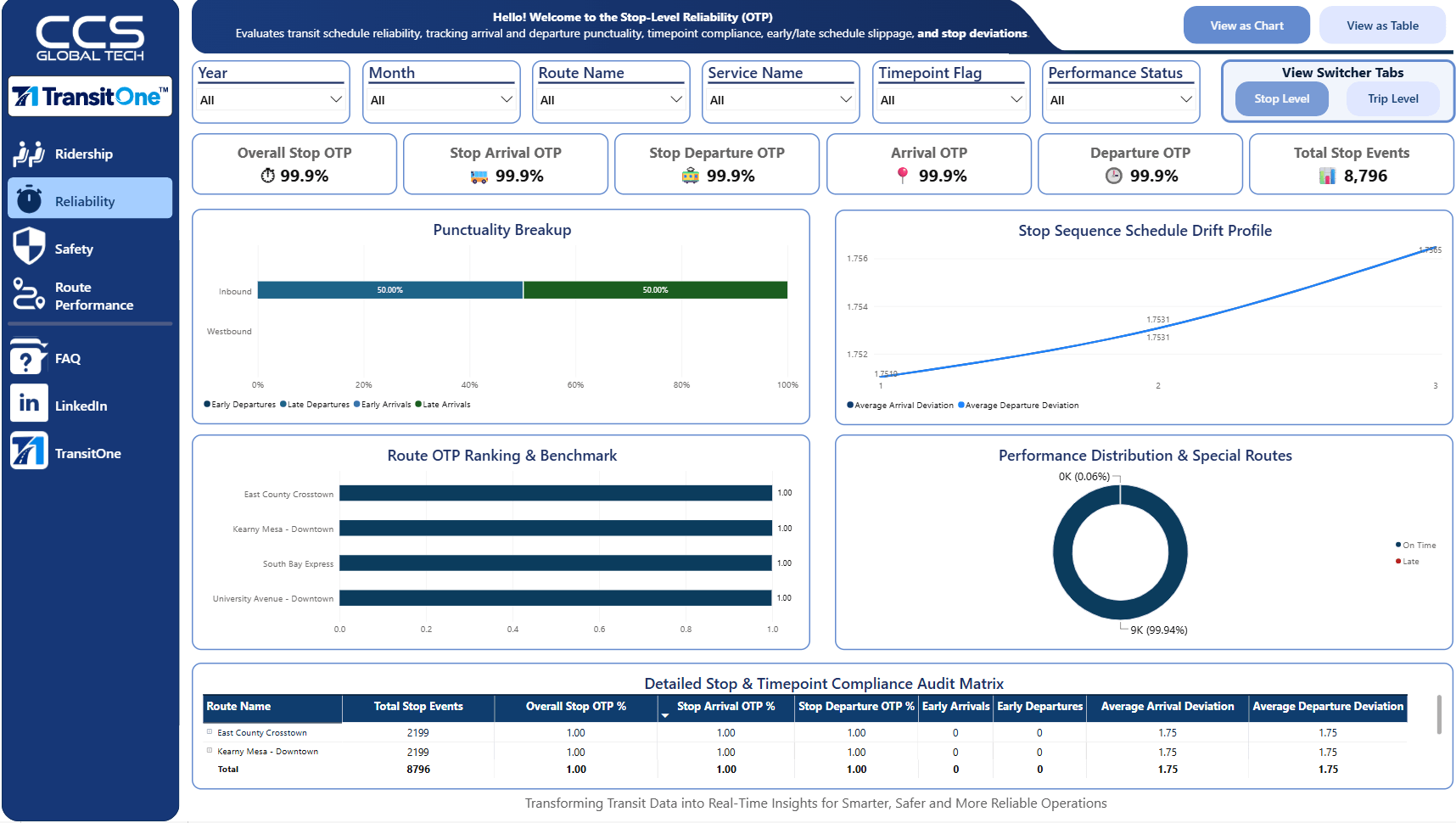
✓ Investigate trip and stop performance exceptions
✓ Maintain OTP adjustments by route, stop, and service dates
✓ Review original and adjusted values
✓ Explore service reliability through your configured dashboard
INSIDE THIS MODULE
Service Miles & Hours
Route Frequencies
Unscheduled Service & Ridership
Available capabilities follow your agency’s configuration and user permissions.
ROUTE PERFORMANCE
Connect Service Delivered With Route Performance
Give operations and planning teams the service context they need to review route performance and interpret changes in delivered service.
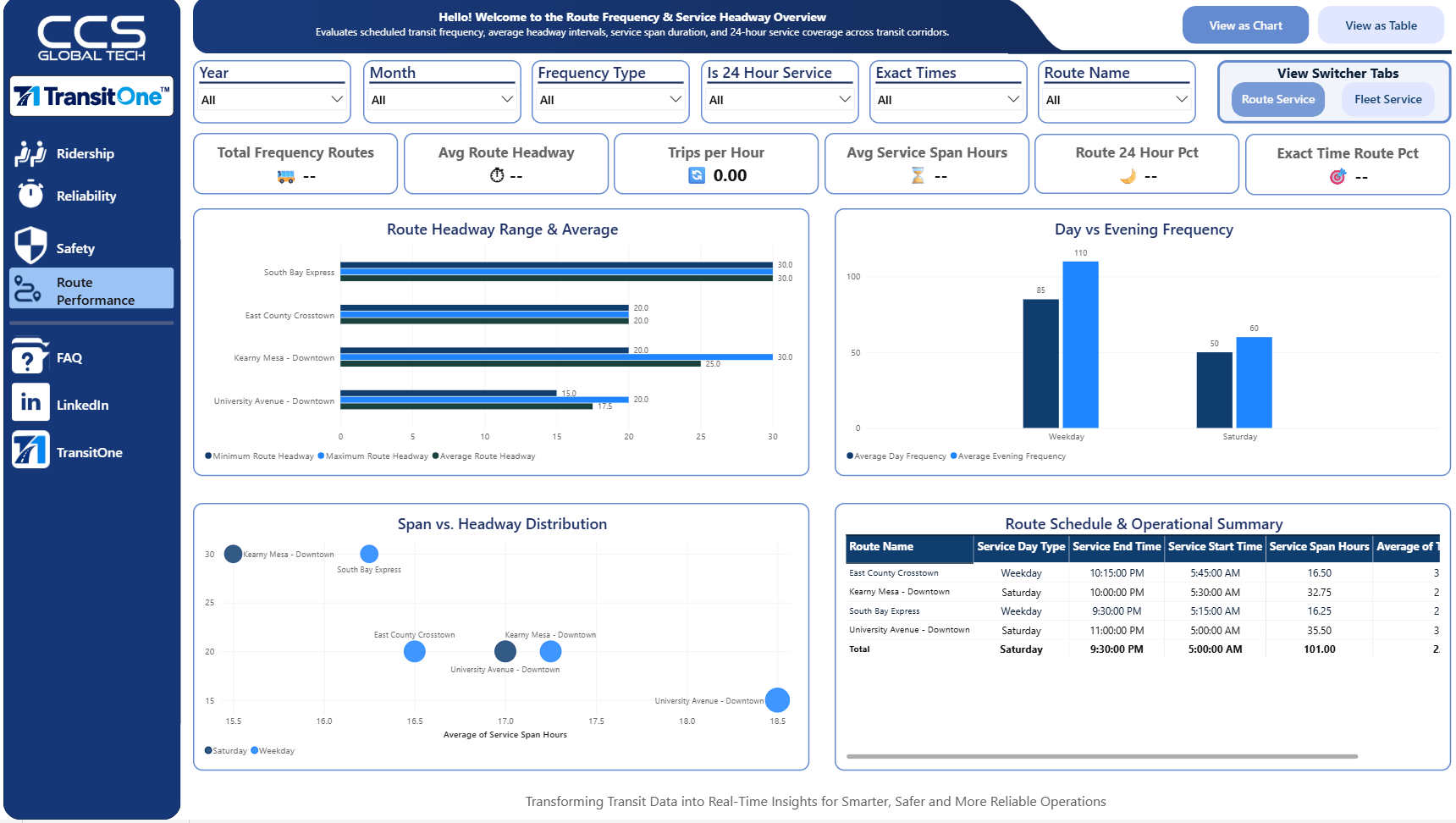
✓ Review operational and cost-related data exceptions
✓ Maintain service miles and hours with route and vehicle context
✓ Manage peak, daytime, and evening route frequencies
✓ Maintain unscheduled service data and explore configured reports
INSIDE THIS MODULE
Incident & Conditions Data Review
Operator, Vehicle & Route Context
Safety Performance Dashboard
Available capabilities follow your agency’s configuration and user permissions.
SAFETY
Put Safety Records in Operational Context
Help safety teams review the incident, operator, vehicle, and route data configured for your agency and correct issues before reporting.
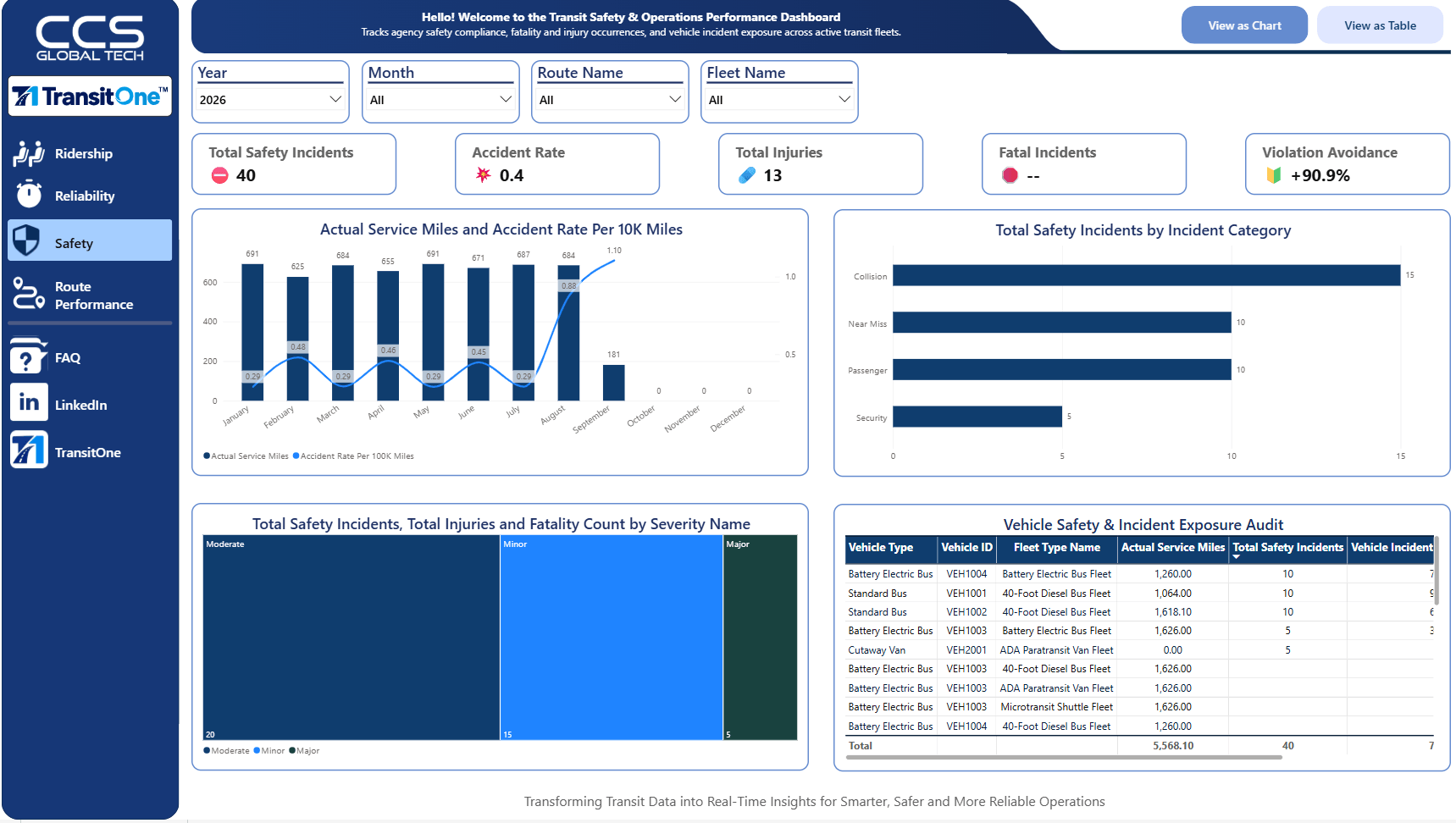
✓ Investigate safety source-data exceptions
✓ Review available incident, operator, vehicle, and route details
✓ Document corrections, comments, and review decisions
✓ Explore safety data through your configured dashboard
INSIDE THIS MODULE
Cost Classifications & Mode Mappings
Trial Balance Adjustments
NTD Form Mapping & Reporting
Available capabilities follow your agency’s configuration and user permissions.
NTD
Prepare the Data Behind NTD Reporting
Bring finance and reporting teams together around financial classifications, allocation reference data, and NTD form mappings.
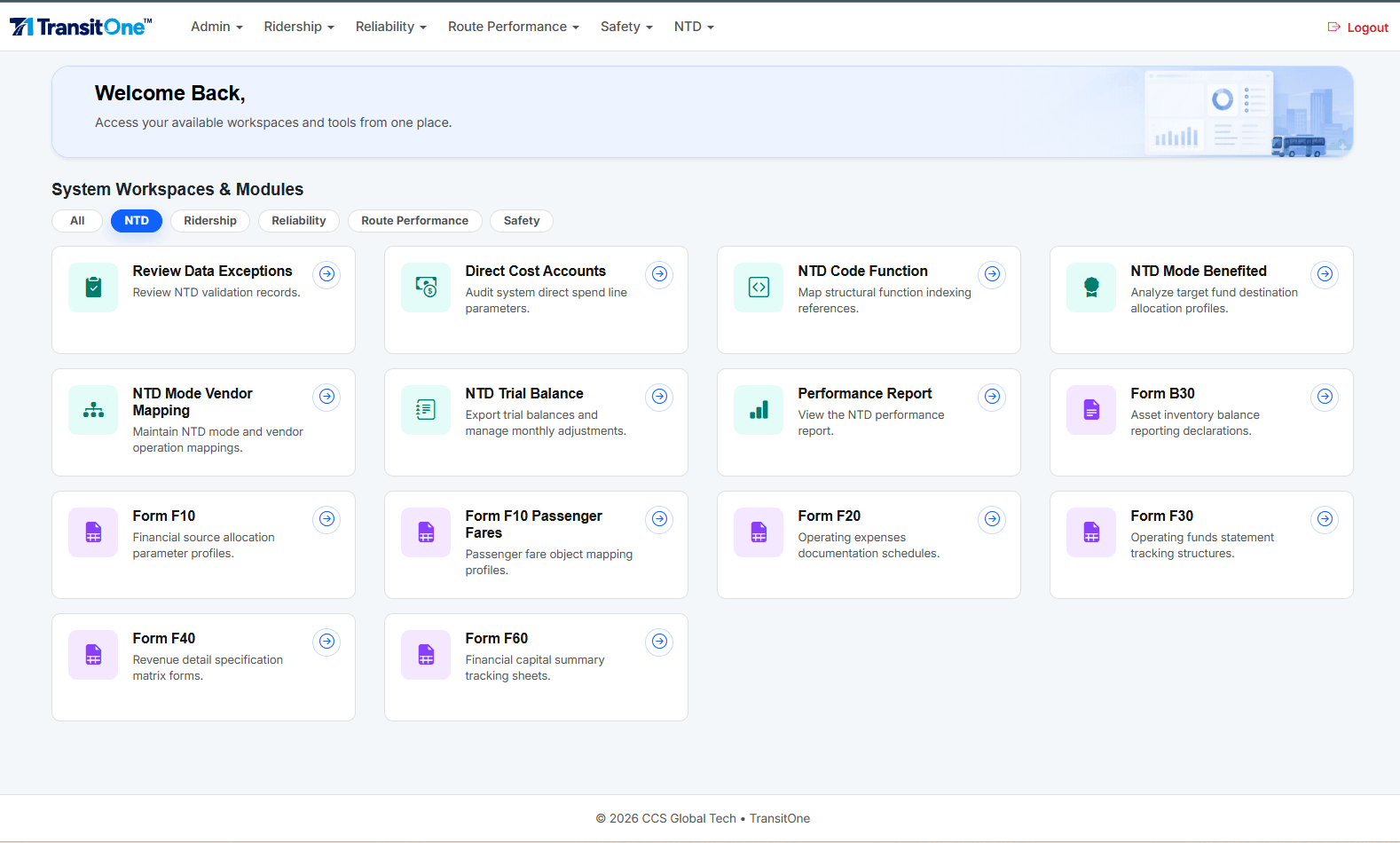
✓ Review financial and NTD source-data exceptions
✓ Maintain cost accounts, functions, modes benefited, and vendors
✓ Manage trial balance adjustments for the selected fiscal period
✓ Maintain form mappings and access configured NTD reports
INSIDE THIS MODULE
Agency User Access
Source Mapping & Transformations
Mapping Review & Publication
Available capabilities follow your agency’s configuration and user permissions.
ADMIN CONSOLE
Coordinate Access and Agency Data Setup
Bring finance and reporting teams together around financial classifications, allocation reference data, and NTD form mappings.
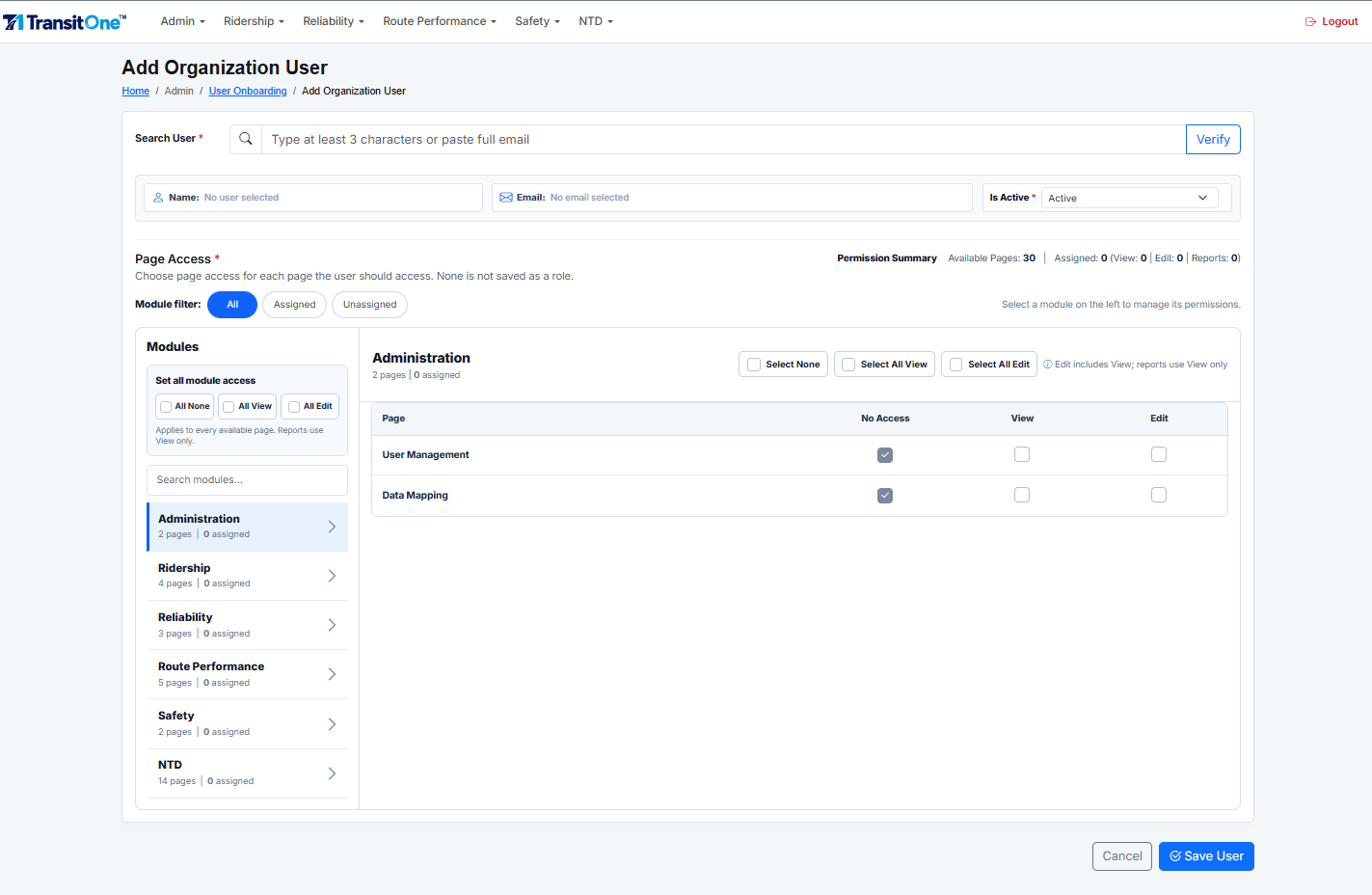
✓ Onboard agency users through their Microsoft directory
✓ Assign View, Edit, and Report Access by enabled feature
✓ Map source fields using transformations, constants, and direct mappings
✓ Submit, review, approve, and publish mapping versions
EXPLORE THE CAPABILITIES
One Workspace,
Across Your Agency’s Priorities
Bring ridership, reliability, route performance, safety, and NTD data together, supported by an Admin Console for access and data mapping.
INSIDE THIS MODULE
Ridership Data Review
Route & Vehicle Odometer Adjustments
Special-Event Context
Available capabilities follow your agency’s configuration and user permissions.
RIDERSHIP
Understand Ridership Across Your Service
Review ridership records and maintain the adjustments and special-event context that help teams interpret passenger activity.
✓ Investigate ridership exceptions in configured source data
✓ Maintain odometer corrections by route, vehicle, and service period
✓ Add special-event context for ridership analysis
✓ Explore ridership through your configured performance dashboard
INSIDE THIS MODULE
Trip & Stop Performance Review
On-Time Performance Adjustments
Reliability Dashboard
Available capabilities follow your agency’s configuration and user permissions.
RELIABILITY
Understand Where Service Runs Off Schedule
Help operations teams review trip and stop performance data and maintain on-time performance corrections with clear service context.
✓ Investigate trip and stop performance exceptions
✓ Maintain OTP adjustments by route, stop, and service dates
✓ Review original and adjusted values
✓ Explore service reliability through your configured dashboard
INSIDE THIS MODULE
Service Miles & Hours
Route Frequencies
Unscheduled Service & Ridership
Available capabilities follow your agency’s configuration and user permissions.
ROUTE PERFORMANCE
Connect Service Delivered With Route Performance
Give operations and planning teams the service context they need to review route performance and interpret changes in delivered service.
✓ Review operational and cost-related data exceptions
✓ Maintain service miles and hours with route and vehicle context
✓ Manage peak, daytime, and evening route frequencies
✓ Maintain unscheduled service data and explore configured reports
INSIDE THIS MODULE
Incident & Conditions Data Review
Operator, Vehicle & Route Context
Safety Performance Dashboard
Available capabilities follow your agency’s configuration and user permissions.
SAFETY
Put Safety Records in Operational Context
Help safety teams review the incident, operator, vehicle, and route data configured for your agency and correct issues before reporting.
✓ Investigate safety source-data exceptions
✓ Review available incident, operator, vehicle, and route details
✓ Document corrections, comments, and review decisions
✓ Explore safety data through your configured dashboard
INSIDE THIS MODULE
Cost Classifications & Mode Mappings
Trial Balance Adjustments
NTD Form Mapping & Reporting
Available capabilities follow your agency’s configuration and user permissions.
NTD
Prepare the Data Behind NTD Reporting
Bring finance and reporting teams together around financial classifications, allocation reference data, and NTD form mappings.
✓ Review financial and NTD source-data exceptions
✓ Maintain cost accounts, functions, modes benefited, and vendors
✓ Manage trial balance adjustments for the selected fiscal period
✓ Maintain form mappings and access configured NTD reports
INSIDE THIS MODULE
Agency User Access
Source Mapping & Transformations
Mapping Review & Publication
Available capabilities follow your agency’s configuration and user permissions.
ADMIN CONSOLE
Coordinate Access and Agency Data Setup
Bring finance and reporting teams together around financial classifications, allocation reference data, and NTD form mappings.
✓ Onboard agency users through their Microsoft directory
✓ Assign View, Edit, and Report Access by enabled feature
✓ Map source fields using transformations, constants, and direct mappings
✓ Submit, review, approve, and publish mapping versions
EXPLORE THE CAPABILITIES
One Workspace,
Across Your Agency’s Priorities
Bring ridership, reliability, route performance, safety, and NTD data together, supported by an Admin Console for access and data mapping.
RIDERSHIP
Understand Ridership Across Your Service
Review ridership records and maintain the adjustments and special-event context that help teams interpret passenger activity.
✓ Investigate ridership exceptions in configured source data
✓ Maintain odometer corrections by route, vehicle, and service period
✓ Add special-event context for ridership analysis
✓ Explore ridership through your configured performance dashboard
INSIDE THIS MODULE
Ridership Data Review
Route & Vehicle Odometer Adjustments
Special-Event Context
Available capabilities follow your agency’s configuration and user permissions.
RELIABILITY
Understand Where Service Runs Off Schedule
Help operations teams review trip and stop performance data and maintain on-time performance corrections with clear service context.
✓ Investigate trip and stop performance exceptions
✓ Maintain OTP adjustments by route, stop, and service dates
✓ Review original and adjusted values
✓ Explore service reliability through your configured dashboard
INSIDE THIS MODULE
Trip & Stop Performance Review
On-Time Performance Adjustments
Reliability Dashboard
Available capabilities follow your agency’s configuration and user permissions.
ROUTE PERFORMANCE
Connect Service Delivered With Route Performance
Give operations and planning teams the service context they need to review route performance and interpret changes in delivered service.
✓ Review operational and cost-related data exceptions
✓ Maintain service miles and hours with route and vehicle context
✓ Manage peak, daytime, and evening route frequencies
✓ Maintain unscheduled service data and explore configured reports
INSIDE THIS MODULE
Service Miles & Hours
Route Frequencies
Unscheduled Service & Ridership
Available capabilities follow your agency’s configuration and user permissions.
SAFETY
Put Safety Records in Operational Context
Help safety teams review the incident, operator, vehicle, and route data configured for your agency and correct issues before reporting.
✓ Investigate safety source-data exceptions
✓ Review available incident, operator, vehicle, and route details
✓ Document corrections, comments, and review decisions
✓ Explore safety data through your configured dashboard
INSIDE THIS MODULE
Incident & Conditions Data Review
Operator, Vehicle & Route Context
Safety Performance Dashboard
Available capabilities follow your agency’s configuration and user permissions.
NTD
Prepare the Data Behind NTD Reporting
Bring finance and reporting teams together around financial classifications, allocation reference data, and NTD form mappings.
✓ Review financial and NTD source-data exceptions
✓ Maintain cost accounts, functions, modes benefited, and vendors
✓ Manage trial balance adjustments for the selected fiscal period
✓ Maintain form mappings and access configured NTD reports
INSIDE THIS MODULE
Cost Classifications & Mode Mappings
Trial Balance Adjustments
NTD Form Mapping & Reporting
Available capabilities follow your agency’s configuration and user permissions.
ADMIN CONSOLE
Coordinate Access and Agency Data Setup
Bring finance and reporting teams together around financial classifications, allocation reference data, and NTD form mappings.
✓ Onboard agency users through their Microsoft directory
✓ Assign View, Edit, and Report Access by enabled feature
✓ Map source fields using transformations, constants, and direct mappings
✓ Submit, review, approve, and publish mapping versions
INSIDE THIS MODULE
Agency User Access
Source Mapping & Transformations
Mapping Review & Publication
Available capabilities follow your agency’s configuration and user permissions.
FOR FINANCE & NTD TEAMS
A Stronger Foundation for NTD Reporting
Organize the financial reference data, classifications, and mappings your reporting process depends on. Keep trial balance adjustments tied to the fiscal period your team is working on.
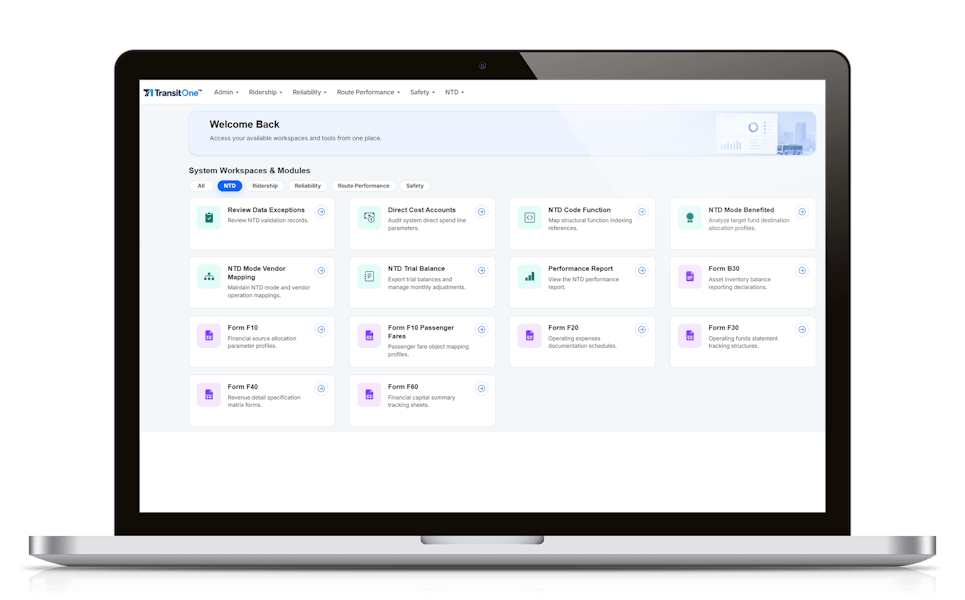
Financial Reference Data
Maintain direct cost accounts, NTD functions, modes benefited, and mode-to-vendor relationships.
Trial Balance Adjustments
Inspect base balances and import adjustments for a selected fiscal year and optional month.
NTD Form Mappings
Maintain classification and mapping records across supported form datasets.
Additional Reporting Needs
Scope additional form coverage with CCS based on your agency’s requirements and available data.
Other NTD Forms
Turn Transit Data into Trusted Insights with TransitOne
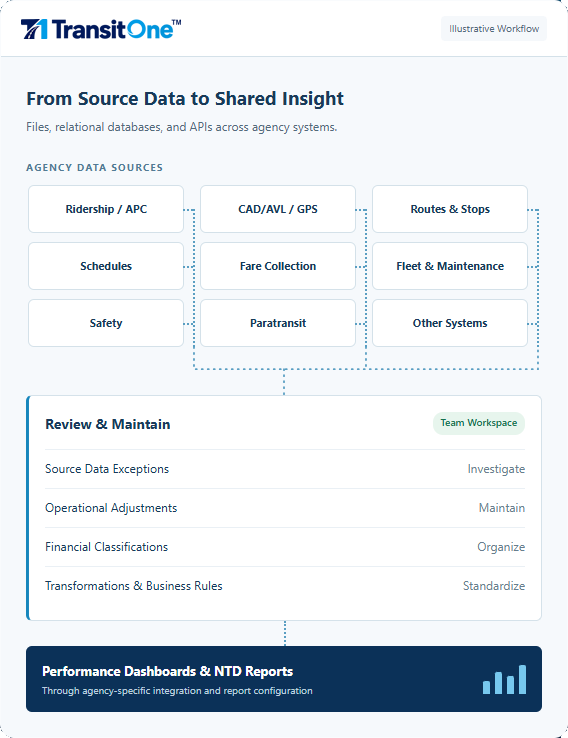
From Source Systems to Insight, Managed End to End
TransitOne brings your agency’s data preparation, quality review, and reporting into one workspace, helping teams resolve exceptions, apply business rules, and turn transit data into insights for operational and leadership decisions.
01 / CONNECT
Map Your Sources
Map agency source data, including direct fields, transformations, and constants. Review and publish approved mappings for downstream integration.
02 / REVIEW
Resolve Data Exceptions
Investigate unresolved records. Make permitted corrections and document comments and review status.
03 / MAINTAIN
Add Business Context
Maintain operational adjustments, reference data, and financial mappings to reflect how your agency operates and reports.
04 / REPORT
Explore Performance
Explore ridership, reliability, route performance, and safety through configured dashboards, and support NTD reporting with prepared agency data.
ACCESS THAT FITS YOUR TEAMS
The Right Access for Every Team
Users sign in with their Microsoft organizational identity. Administrators assign access within the features enabled for your agency, with organization-specific data and configuration.
Onboard directory users and manage active status and feature permissions.
Prepare source mappings and move them through review and approval.
Review submitted mappings, return them for changes, or approve publication.
Correct and maintain authorized operational or financial datasets.
Access pre-configured reports for performance monitoring.
YOUR QUESTIONS, ANSWERED
Plan for Your Agency’s Needs
Start by sharing your agency’s top priorities, the systems and data involved, and the teams who will use TransitOne. CCS will work with you to review sample data, confirm access and reporting needs, and define a focused implementation plan aligned with your goals and resources.
Yes. Start with the TransitOne suite that addresses your agency’s most pressing need, such as ridership, service reliability, or NTD reporting. Expand to additional suites, teams, and data sources as your priorities evolve, at a pace that fits your agency’s resources and budget.
No. TransitOne works alongside your existing systems, bringing their data together for quality review, analysis, and reporting. Your teams can continue using their operational and financial applications while TransitOne helps turn that data into consistent insights and reporting outputs.
Yes. TransitOne offers connectivity with a range of transit and enterprise systems through file-based imports, relational database connections, APIs, and configured integrations. Connectivity is tailored to your agency’s source systems, available data access, and reporting needs, with specific methods confirmed during implementation.
Authorized users can review flagged records, make corrections, add comments, and update review status within TransitOne. For supported workflows, teams can also upload adjustments using Excel templates, with validation feedback and import history to support review. This helps agencies account for operational exceptions and business context before data is used in dashboards and reports.
TransitOne’s NTD module helps automate the reporting process, from bringing operational and financial data together to applying account classifications, trial balance adjustments, mode mappings, and function codes. It supports validation, reconciliation, and exception review, helping teams generate NTD-ready reporting formats for agency review and submission.
TransitOne’s data updates and report refresh schedules are configured around your agency’s operational and reporting needs, based on source system availability. Corrections and imported adjustments appear after the relevant data processing and report refresh are complete.
TransitOne helps automate NTD data preparation, validation, and reporting to produce NTD-ready outputs. Your agency reviews and approves the final reports before submitting them to the FTA.
Yes. TransitOne lets administrators tailor access to each team’s responsibilities. Authorized users can review and maintain relevant data, while others have view-only or report access. This helps operations, planning, and finance teams work in one workspace with appropriate controls over who can view and change information.
TransitOne offers a flexible, usage-based subscription with no upfront commitment. Start with the suite that addresses your immediate priorities and expands as your needs grow. Pricing is tailored to your selected capabilities, data scope, and support needs.
Yes. Start with a focused suite and CCS support for integration, data preparation, and reporting. This helps your agency adopt TransitOne within the capacity of your existing team.
Your first TransitOne suite can be up and running in as little as 15 days, depending on scope, source data readiness, and access availability. CCS will confirm a rollout timeline based on your agency’s requirements.
CCS provides training tailored to administrators, Power Users, and report users, along with ongoing technical and reporting support based on your service scope.
TransitOne’s security approach aligns with industry practices for identity management, role-based access, and data protection. Security controls, hosting arrangements, and access policies are configured to support your agency’s governance and compliance requirements.
Yes. Your agency retains ownership of its data. Your agreement defines how that data is accessed and used to deliver TransitOne services, along with arrangements for data export and transition.
Yes. TransitOne supports configured transformations, mappings, and business rules to reflect your agency’s operational and financial reporting needs.
Yes. TransitOne maintains logs showing who made a change, when it was made, and which records were changed. Together with review comments, record statuses, and import history, these logs support traceability, accountability, and audit review.
As NTD reporting requirements evolve, CCS helps your agency assess the changes and update TransitOne’s mappings, classifications, and reporting configurations through your agreed support plan.
SEE TRANSITONE IN ACTION
Plan for Your Agency’s Needs
Bring your transit data workflows and reporting needs into one conversation.